PAC Toolkit · Chrome extension · v0.1.0 · for Pokémon Auto Chess
Shop Type Filter
Pick the types you're rolling for. While you reroll, every shop card without one of them disappears. Its slot stays where it was, so nothing shifts under your cursor, and Ditto always stays visible.
Every screenshot on this page shows the real, built extension running in Chromium on a replica of the game's shop, not a live match. How the replica was made and what that means.
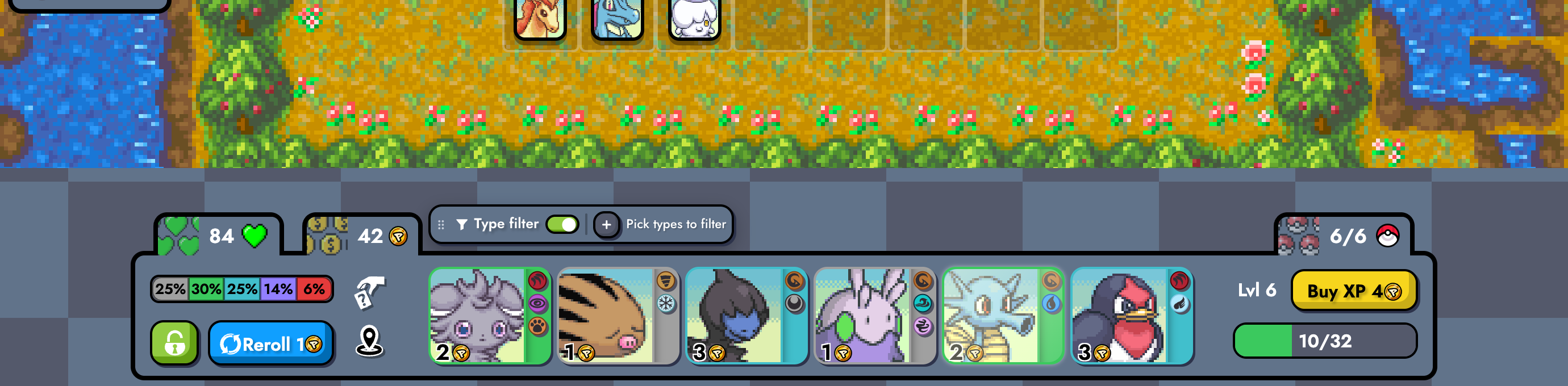
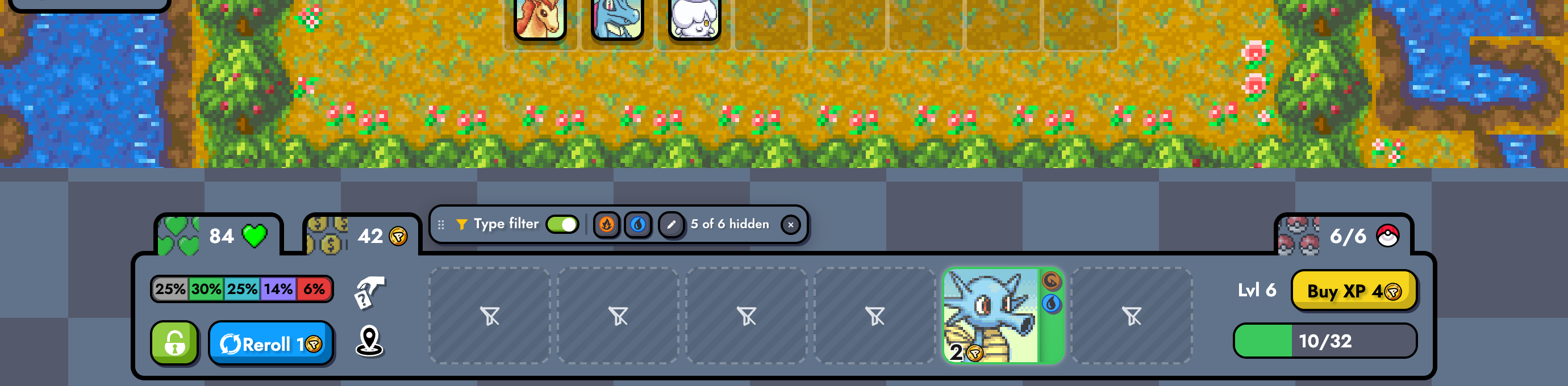
Ten rerolls, one filter
Fire + Water picked, “Always show Ditto” on. Step through ten seeded rerolls and switch the filter off to see what it took away. The cards below the frame say why each one stayed or went.
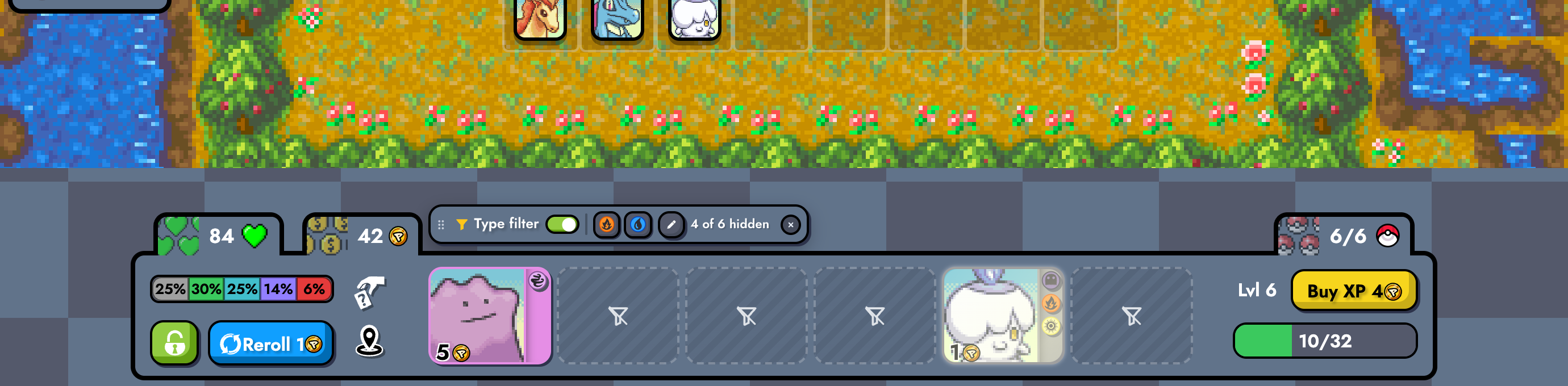
4 of 6 hidden · Ditto, Litwick stay
Every frame was checked against the game's own type data (pokemons-data.csv from the game's source): 10 of 10 rerolls keep exactly the right cards. The replica rolls Ditto at 6% per slot, against 0.5% in the real game, so the exception shows up often.
Using it
Everything happens from a small bar the extension adds above the shop. It shows up only while you're in a game.
Find the bar above the shop
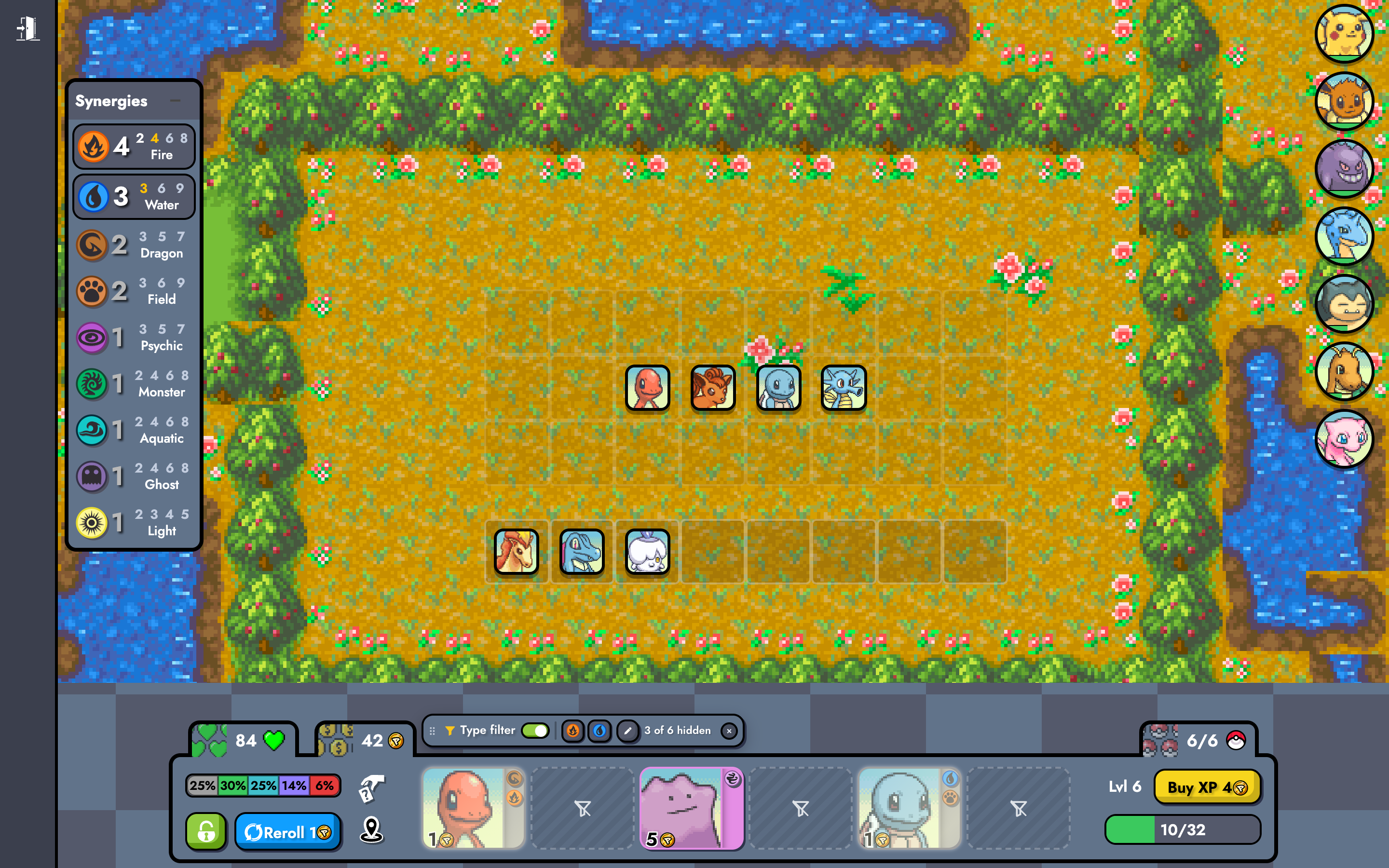
The bar has a grip (drag it anywhere; double-click the grip to put it back), an on/off switch, one chip per picked type (click a chip to drop that type), the edit button, a live count and a clear button. In short windows it moves beside your board and bench instead of covering them.
Pick your types
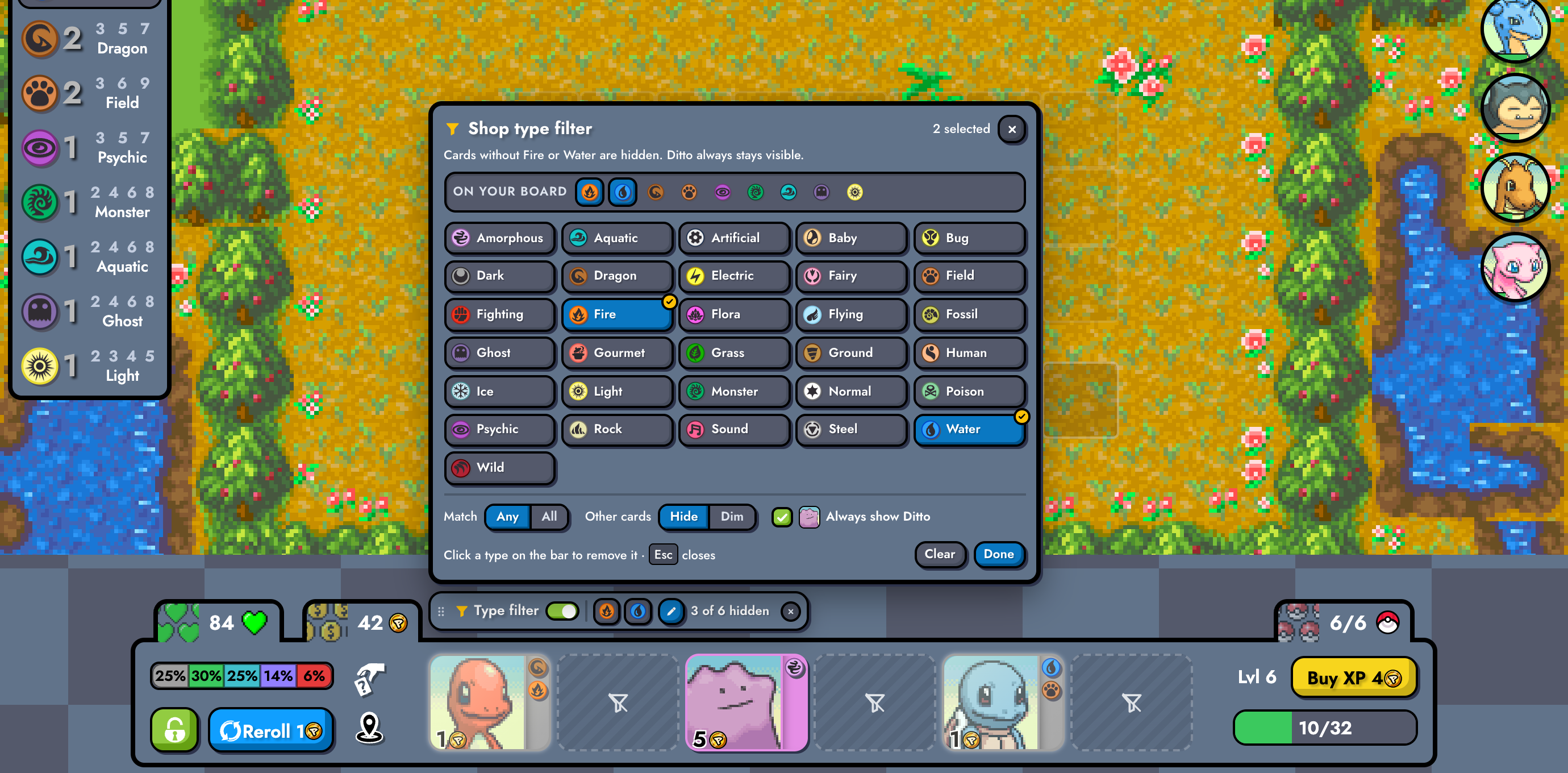
“On your board” copies the game's synergies panel, so the types you're already building are one click away. The line under the title always says in words what the current settings do. Esc or a click outside closes it.
Roll as usual
Press D or click Reroll as you always do. Each new shop is filtered before the browser draws it, so a card you don't want never flashes on screen.
Your game hotkeys keep working. Clicking the bar never leaves keyboard focus in it, so D, E, F, R and Space still reach the game right after.
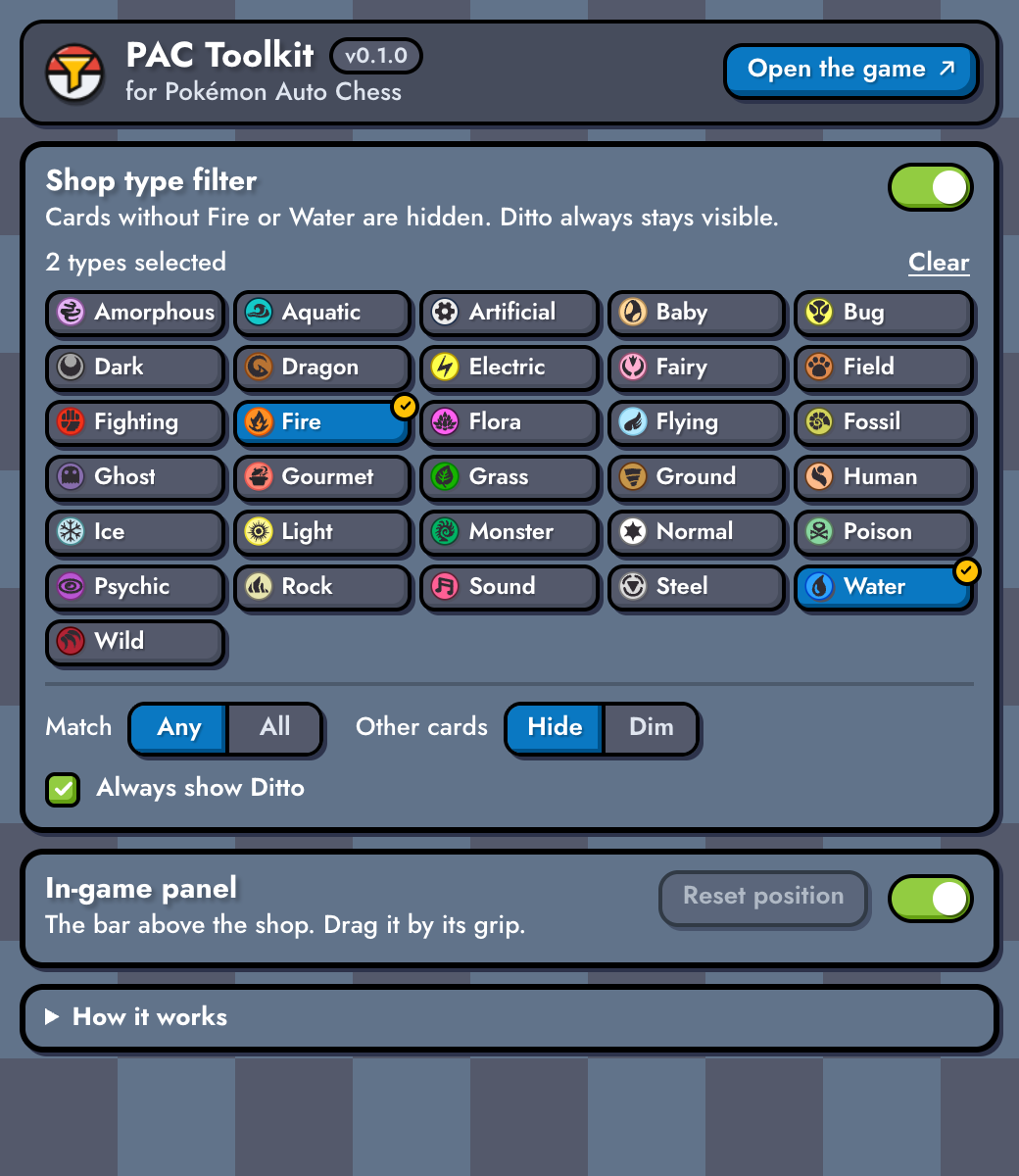
The toolbar popup has the same controls, plus a switch to hide the in-game bar entirely (the filter keeps working) and a button to reset its position. Changes apply to an open game straight away, in both directions, and are remembered between sessions.
What stays and what goes
The filter only ever touches the six cards of your shop. Nothing is filtered until you pick at least one type, and the switch pauses it without forgetting your picks.
Match: Any default
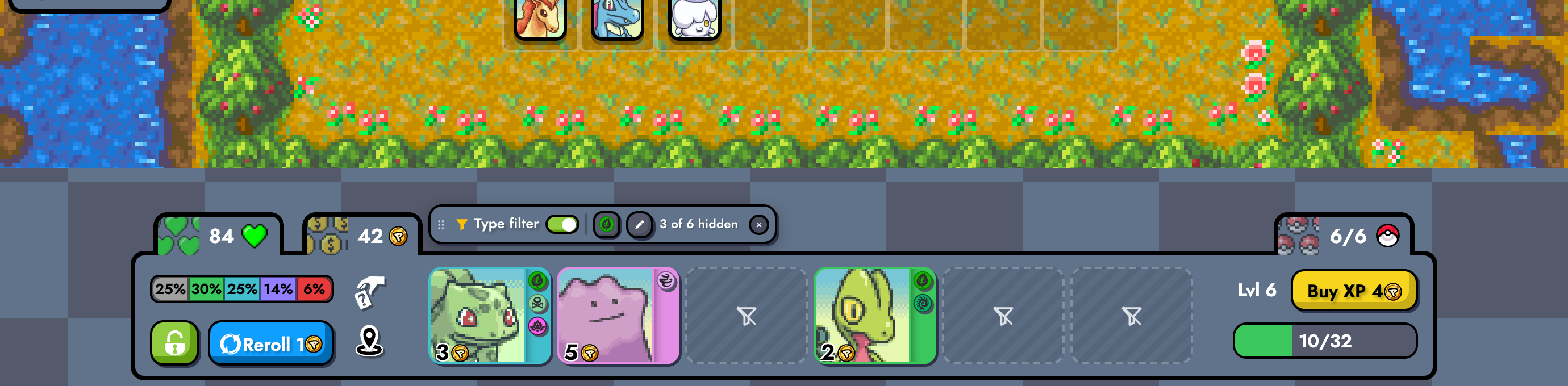
A card stays if it shows at least one of your types. With All, it must show every one of them.
Ditto always stays
Ditto copies whatever you need, so it's never hidden, whatever you picked. Untick “Always show Ditto” to filter it like any other card.
Every icon on the card counts
When buying a card would evolve your unit, the game shows the evolution's types, marking gained and lost ones. All of them count, so a card whose evolution gains your type stays.
Hide or Dim
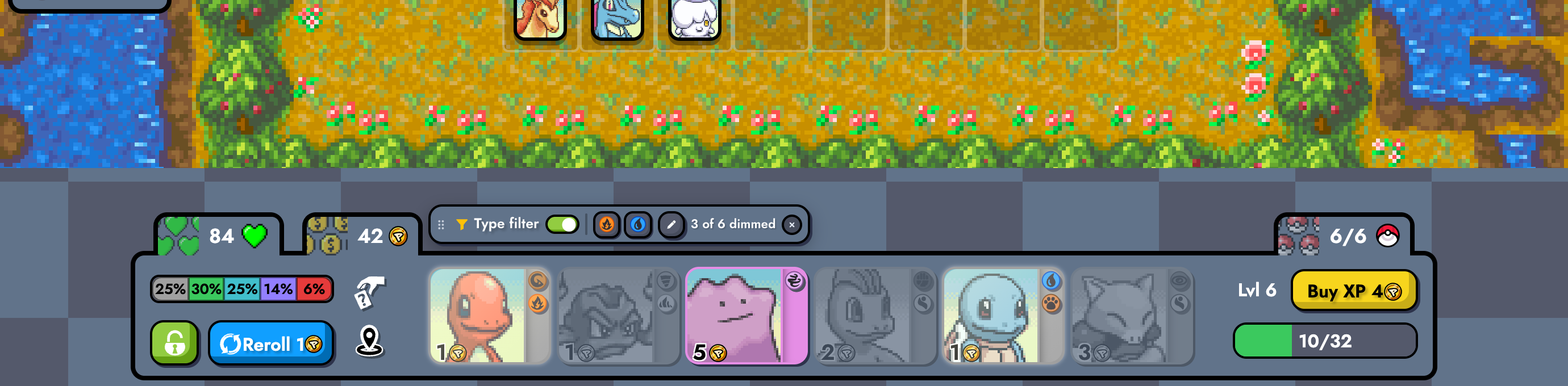
Hide turns the card into a dashed placeholder you can't click or hover. Dim fades and greys it, but you can still buy it.
The rest of the game is left alone
Your board, bench, propositions, the team planner and the replay viewer are never filtered. The bar stays out of replays too.
Empty isn't hidden
A hidden card's placeholder has a crossed-out funnel, so you can tell it apart from a slot you just bought from, which stays plain.

How it works
Two small content scripts. One runs inside the game's page and does the filtering and the bar; the other keeps your settings in Chrome's storage. Neither sends anything anywhere.
On every shop change
- The game redraws the shopAfter a reroll, a purchase, the lock or any other update, React commits new cards into the same six slots.
- An observer firesA MutationObserver on the shop runs before the browser paints the new cards.MutationObserver
- Each card is readTypes come from the card's own type icons. The Pokémon's name comes from React's props on the shop list.img.synergy-icon[alt]
- Keep, hide or dimA pure function applies your types, Any/All and the Ditto rule.classify.ts
- The card is markedA
data-pac-filterattribute plus one stylesheet do the hiding. React's own attributes are never changed.data-pac-*
Your settings
- Popup or in-game barYou pick a type or flip a switch.
- Chrome storageOne settings object, checked and cleaned on every read.chrome.storage.local
- Bridge scriptRuns in the extension's isolated world and relays changes both ways.ISOLATED world
- Filter scriptRuns in the page's world and applies the settings the moment they arrive.MAIN world
- Why run inside the page
- The card portrait is drawn from a base64 texture, so the Pokémon's name isn't in the page's HTML. It is in the props React keeps on the shop's
<ul>(__reactProps$…), which only a script in the page's own world can read. React rewrites those props on every commit, so they are never stale. - How Ditto is recognised
- By name from those props (
"DITTO"). If they can't be read, a card counts as Ditto when it has Special rarity and Amorphous is its only type (only Ditto matches that in the game's v6.11 data), or when its portrait URL contains/0132/. - No flash, no layout shift
- The work runs synchronously in the observer callback, before paint. A test that deliberately made it asynchronous fails. Hidden cards keep their size, so the cards you want never move.
- Safe with the game's hotkeys
- The game reads keys like D and Space from the whole window. The bar never keeps focus after a mouse click, and only swallows keys while you're navigating it with the keyboard.
- Only the
storagepermission - No host permissions, no remote code, no analytics. Its only network requests are the game's own type icons and Ditto's portrait, loaded from the game's server.
- Built to grow
- Each feature is a module with its own settings namespace. The type filter is the first; adding the next one is a registry entry plus its module (see “Adding a feature” in the README).
Testing
All tests pass on a clean build. The end-to-end tests load the real, built extension into headless Chromium, the same way Chrome loads it when you install it.
The replica it runs against
You chose not to run a live match, so the tests use a small React 19.2.7 app (the same React version as the live site) that rebuilds the shop exactly as the game's source renders it:
- The same components, props (
origin,index,pokemon), keys, class names, rarity styles, tooltips and evolution icons. This was checked against the game's source (v6.11) and the live production bundle (v6.11.1). - Served at the real address,
https://pokemon-auto-chess.com, through Playwright's request routing, with the live site's Content-Security-Policy. The extension's real manifest applies unchanged. - It uses the game's CSS, type icons, portraits and map tiles from its open-source repository, and the roster from the game's data. It also has a lobby, SPA navigation and a replay route.
Not tested
- A live match on pokemon-auto-chess.com. It needs a signed-in account, and you chose replica-only. The first real game is the remaining check.
- Browsers other than Chromium, such as Edge or Brave. They should work (Manifest V3, Chrome 111+) but haven't been run.
- Publishing.
npm run packagebuilds the Chrome Web Store zip; nothing was submitted.
| # | Required end-to-end case | Result |
|---|---|---|
| 1 | The bar appears on the game route only, and follows single-page navigation (lobby → game → lobby, back/forward) with no console errors | ✓ pass |
| 2 | Picking Fire leaves exactly the Fire cards and Ditto; the others are invisible, unclickable placeholders; the count is right | ✓ pass |
| 3 | 200 seeded rerolls, alternating the button and the D key; every slot checked in the next animation frame | ✓ pass |
| 4 | Ditto stays when Amorphous isn't picked; hidden when “Always show Ditto” is off | ✓ pass |
| 5 | Match “All” needs every picked type | ✓ pass |
| 6 | Dim keeps cards buyable; a real mouse click on a hidden card buys nothing | ✓ pass |
| 7 | Evolution icons (gained / lost) count; hovering a card (its tooltip has more type icons) changes nothing | ✓ pass |
| 8 | A bought slot carries no marks; switching the filter off removes every mark | ✓ pass |
| 9 | Settings survive a reload and sync live between the real popup page and the game tab, both ways | ✓ pass |
| 10 | D still rerolls after clicking the bar; Esc closes the picker; keyboard-only use of the bar never triggers a game action | ✓ pass |
| 11 | A shop rendered without React internals: Ditto is still kept by the fallback rule | ✓ pass |
| 12 | With the in-game bar hidden, the filter still applies | ✓ pass |
| 13 | The bar can be dragged; its position is saved once per drag, kept on screen, and reset by a double-click | ✓ pass |
The other 29 end-to-end tests cover the replay viewer, stacking under the game's tooltips and modals, layout at 1920 × 1080 down to 1366 × 657, WCAG AA contrast of every panel text at 1280 × 720, every popup and panel control, saving a change made just before the popup closes or the tab reloads, and clean-up when the extension is reloaded or disabled.
How it was reviewed
After the first build, four independent reviewers went over it: one checked it against the real game's code, one checked the UX with screenshots, one checked it against the spec and its tests, and one reviewed the code. Each reviewer's findings then went to a separate verifier whose job was to refute them. Of 38 findings, 6 were refuted and 32 confirmed. 31 are fixed with tests. The last one is a documented design limit (page scripts can see the settings messages; see below). Some notable fixes:
- The bar used to appear in the replay viewer, over its controls. It now stays out of replays.
- The default position covered the bench in common windowed sizes. It now steps aside.
- The popup was taller than Chrome's 600 px limit. It now fits without scrolling.
- After clicking the board, keyboard focus could stay in the bar and swallow Space. It no longer does.
- A change made in the last 250 ms before closing the popup could be lost. It is now saved.
Install
The project is at /Users/ditto/pac-toolkit, with its spec in SPEC.md and full docs in README.md. It needs Node 20.10+ and Chrome 111+.
cd /Users/ditto/pac-toolkit
npm install
npm run build # writes the unpacked extension to dist/- Open
chrome://extensionsand turn on Developer mode (top right). - Click Load unpacked and choose
/Users/ditto/pac-toolkit/dist. - Open pokemon-auto-chess.com and start a game. The bar appears above the shop.
| Command | What it does |
|---|---|
npm test | Unit tests, then the end-to-end suite (about 25 s) |
npm run screenshots | Regenerates docs/screenshots/ |
npm run watch | Rebuilds dist/ on every change; press reload on the extension's card |
npm run package | Writes pac-toolkit-0.1.0.zip for the Chrome Web Store |
Limitations
- Not yet run in a live match. Everything about the game's page comes from its source and the live bundle. A future game update that renames the shop's classes or props would need a matching update here.
- Ditto fallback. If React's props can't be read, a new Special-rarity Pokémon whose only type is Amorphous would also be kept as Ditto.
- Spectating. The game hides your shop while you watch another board or after you're eliminated, so the bar goes away then too.
- Zoomed camera. The bar avoids your board and bench at the default zoom. If you zoom in, drag it wherever you like.
- Hover. If a card is hidden while your cursor rests on it, the game may treat it as hovered until the mouse moves.
- Re-enabling. Disabling or reloading the extension cleans open tabs within about 2 seconds, but turning it back on needs a page reload.
- Page scripts. The two scripts talk through page events, so any script on the game page could read or change your filter preferences. Everything passed is checked and cleaned, and it's only UI preferences.